Live captions and transcription
In-call captions with post-meeting transcripts, generated during the call and attached to the recording.
AI-Built Zoom Clone
An AI-first build of the video-conferencing pattern: live captions and meeting summaries generated in-call, quality analytics that find problems before callers complain, and server-enforced governance. Three synced panels ship white-label with 100% source code. The almost-ready AI build goes live in 6 working days; a custom build takes 3 to 4 weeks.
Launch-ready from
$2,799
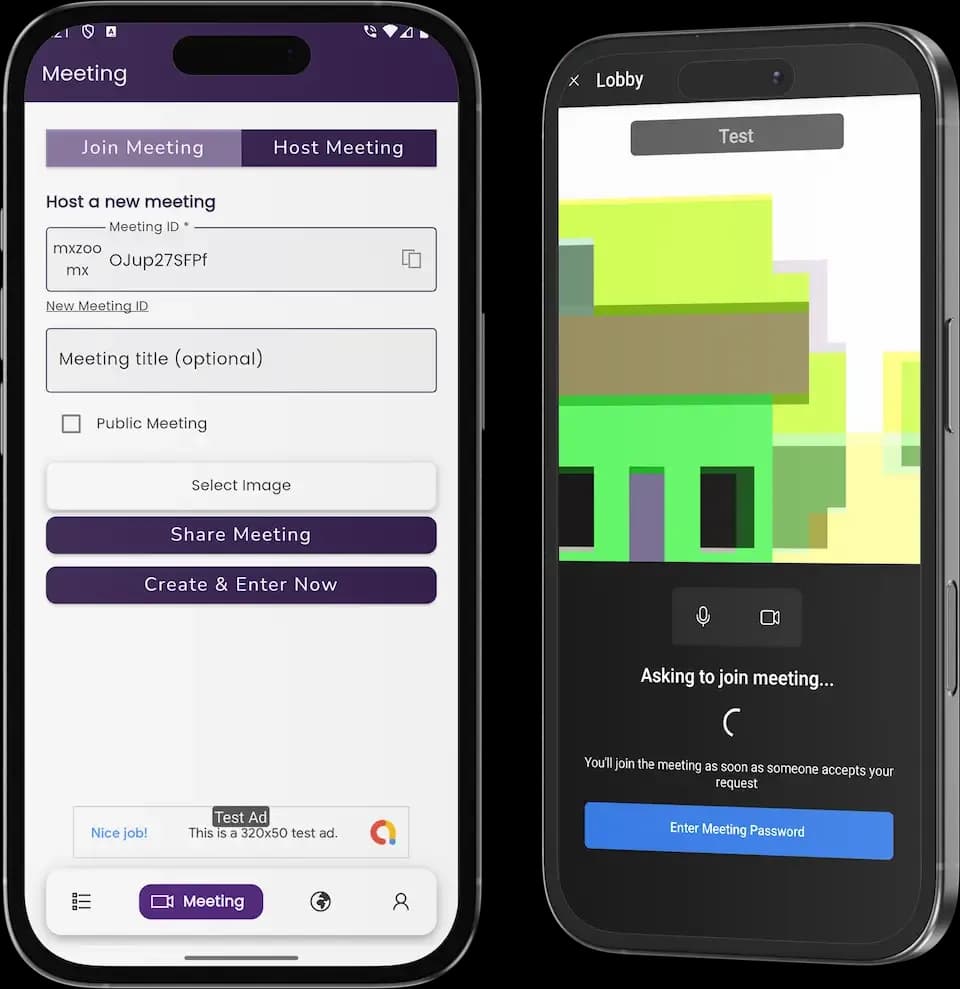
Synced panels
Almost-ready AI launch
Custom build
Source-code ownership
Trusted by the brands we build for



Canonical Moxace facts behind every build.
overview
A Zoom clone app is a video-conferencing platform: hosts schedule and run HD meetings with screen share, breakout rooms, whiteboards, polls, and recording, while participants join in one tap from any device. Ours is built AI-first, with live transcription, meeting summaries, and quality analytics running as model-driven services in the platform core. It ships as participant apps, host and breakout controls, and an organization-grade admin console under your brand.
The business purpose is ownership of a recurring-revenue communication product. Seat-based licensing for meeting platforms is a proven SaaS model, and operators launch their own for three reasons: margin, since per-seat SaaS fees compound; policy, since recordings and data stay on infrastructure they control; and embedding, since conferencing slots neatly into telehealth, tutoring, and consulting products.
Engineering centers on media architecture: SFU clusters with simulcast video, adaptive bitrate per participant network, TURN traversal for difficult networks, and encryption policy enforced server side, so quality and governance are not left to client goodwill.
Hybrid work and remote services locked in video-first communication habits, and vertical deployments such as telehealth and online tutoring keep the category expanding well beyond office meetings.
The headline layer above the panel detail below.
In-call captions with post-meeting transcripts, generated during the call and attached to the recording.
Action items and key points summarized from the transcript, delivered to the host after each meeting.
MOS, jitter, and join metrics per meeting and region, surfaced before participants complain.
SFU-based video with simulcast and adaptive bitrate, so calls degrade gracefully on weak networks instead of dropping.
Host-created rooms with manual or automatic assignment, timed recall, and saved layouts for recurring meetings.
Cloud or local recording with retention policies, plus attendance and engagement reports per meeting.
Server-enforced entry policy so no client can bypass host controls.
Seats, licensing, SSO, role-based access, and usage analytics for the businesses you sell to.
Every profile on this list pays per-seat SaaS fees today and can own the product instead.
Embedding branded, policy-controlled rooms into the care they already sell, with recording retention under their rules.
Running sessions on their own platform with breakout rooms, whiteboards, and session reports parents value.
Putting client meetings on branded infrastructure, with recording governance that matches their contracts.
Adding conferencing as a product line, with seat billing and usage metering built in.
Running internal and client meetings under strict data-residency policy, or serving markets where incumbent pricing is unattractive.
Participant, host, and operator surfaces, each built for reliability over novelty.
Joining, talking, and collaborating without friction.
The room-management tooling that separates conferencing from a video call.
Organization-grade administration for your customers or your own teams.
Four consoles, one view of the platform's organizations, quality, and revenue.
Organization and seat management with host entitlements, licensing and subscription billing, SSO and role-based access administration, and user reports handled from the same dashboard.
Usage and quality analytics (MOS, jitter, joins) per meeting, region, and network, SFU capacity planning with autoscaling policy, TURN infrastructure oversight, and regional CDN tuning.
Recording retention and access policies, encryption policy configuration, anomaly review of unusual join patterns and recording-access events, and audit logs for regulated deployments.
Subscription and payment management across seats and add-ons, plan configuration for meeting tiers, API keys and webhook management, and brand and email template administration.
The meeting lifecycle your platform runs reliably, call after call.
A host schedules a meeting, sets passcode and waiting-room policy, and invites arrive by link, calendar entry, or meeting ID.
Participants join in one tap, media negotiates a path through the SFU, and the host admits or holds them in the waiting room.
Video, screen share, chat, polls, and the whiteboard run concurrently, with captions generated live and adaptive quality adjusting per network.
The host splits participants into breakout rooms, assigns them manually or automatically, and recalls everyone to the main session on a timer.
The meeting records to cloud or local storage, attendance and engagement reports generate, and the room closes with retention rules applied.
Recordings, transcripts, AI summaries, and reports become available per policy, and organization admins audit usage from the console.
Five model-driven systems working the same meeting stream. Each ships pre-tuned for conferencing and sharpens as your data compounds.
Generates in-call captions and attaches searchable transcripts to recordings, per language configured for your market.
Live audio streams, meeting language settings, speaker turns
Accessible, searchable meetings without a stenographer
Produces action items and key points from the transcript after each call, delivered to hosts automatically.
Transcripts, participant roles, meeting type
Follow-ups that happen without rewatching recordings
Tracks MOS, jitter, and join failures per meeting, region, and network, surfacing degradation before callers complain.
Media metrics, network conditions, device types, regions
Proactive capacity and TURN tuning by region
Removes keyboard, fan, and background noise in real time so calls stay intelligible on poor hardware.
Live audio, noise profiles, device class
Meetings that work from kitchens and cafes
Flags unusual join patterns, failed-policy events, and recording-access anomalies for your administrators.
Join metadata, policy events, access logs
Governance that holds without reading every log
platform concepts
Conferencing quality is decided by media architecture. Calls route through SFU clusters that receive every participant's stream and redistribute it, with simulcast letting each sender upload a few quality tiers and the server pick what each receiver's bandwidth supports. Signaling, TURN traversal, and adaptive bitrate are the plumbing that makes join-and-talk feel instant.
Governance concepts sit above the media. The host role is a permission set: admit, mute, eject, breakout, and record, all enforced server side so no client can bypass policy. Recording is a lifecycle too: captured, stored encrypted, retained per policy, and shared under access rules.
At the organization level, seats and licensing define who can host, SSO and roles define who can administer, and usage metering reports quality metrics like joins and jitter back to your operators.
Four groups, each mapped to the part of the meeting promise it protects.
SFU clusters redistributing every participant's stream with simulcast quality tiers, TURN/STUN traversal, adaptive bitrate, and noise suppression, so join-and-talk feels instant on any network or device.
Video, screen share, chat with file sharing, polls, whiteboards, and breakout rooms with manual or automatic assignment, with live captions generated during the call and virtual backgrounds for every camera.
Cloud or local recording under encrypted retention policies, searchable transcripts, AI summaries with action items, and attendance and engagement reports, so a meeting's value outlives the call.
Seat licensing with host entitlements, SSO and role-based administration, meeting passcodes with waiting-room admission, encryption policy configuration, and usage analytics (MOS, jitter, joins) reported back to operators.
revenue model
Revenue follows seat-based subscriptions with tiered meeting lengths and participant caps, pay-per-host licensing for enterprises, add-on cloud-recording storage, and branded telehealth or tutoring deployments where the platform is embedded into another service.
Billing runs through your own gateway since 100% of the source code is yours. Compliance-sensitive deployments, such as telehealth rooms, pair naturally with our telemedicine app development practice.
insight
Video conferencing remains a structural fixture of work after the hybrid-shift years, with the market projected well past ten billion dollars globally by 2030 according to widely published industry analyses and education, telehealth, and services delivery all running through meeting rooms. Buyers in this category pay for reliability, governance, and data control, not novelty.
The wedge for a regional or vertical operator is the embedded deployment: a conferencing platform tuned to telehealth triage, tutoring cohorts, or a regulated industry's data-residency needs wins accounts the general platforms price and policy for everyone. Seat economics and metered add-ons do the rest. The revenue table below quantifies the lines.
revenue model
Revenue follows seat-based subscriptions with tiered meeting lengths and participant caps, pay-per-host licensing for enterprises, add-on cloud-recording storage, and branded telehealth or tutoring deployments where the platform is embedded into another service.
Billing runs through your own gateway since 100% of the source code is yours. Compliance-sensitive deployments, such as telehealth rooms, pair naturally with our telemedicine app development practice.
Six monetization lines across the platform, quantified against published industry benchmarks. Every rate is admin-configurable; the figures here are modelling inputs, not projections of your platform's earnings.
| Criteria | Revenue line | How it is charged | Typical range | What sets the ceiling |
|---|---|---|---|---|
| Seat subscriptions | Per-host or per-seat monthly licensing with meeting-length and participant tiers | Pro-style seats commonly $10 to $25+ per host per month | Reliability. Seats renew where join quality holds at peak | |
| Enterprise host licensing | Pay-per-host contracts with SSO, governance, and support terms | Enterprise seats commonly $15 to $40+ per host per month | Governance depth. Enterprise pays where audit and policy answers exist | |
| Cloud-recording storage | Metered add-on storage for recordings and transcripts | Commonly $5 to $15+ per host per month or per-GB metered | Retention economics. Storage earns where recordings become organizational knowledge | |
| Large-meeting and webinar add-ons | Capacity add-ons for webinars and town halls beyond seat caps | Webinar capacity commonly $40 to $300+ per month by attendee tier | Event calendars. Add-ons sell where organizations run scheduled broadcast moments | |
| Vertical embedded deployments | White-label or API-embedded rooms for telehealth, tutoring, or services | Per-organization contracts priced above retail seats | Domain fit. Embedded rooms win where the workflow is configured, not generic | |
| AI meeting products | Captions, summaries, and translation sold as premium layers | Commonly $5 to $15+ per user per month add-on | Knowledge value. AI layers earn where transcripts become searchable assets |
Standard inclusions on every engagement, almost-ready or custom. Nine things you never have to ask for.
Meeting apps, host controls, and admin console transfer to you on delivery, with documentation and deployment scripts.
Your brand across every app, invite email, and meeting surface, deployed on your infrastructure.
Mobile builds submitted to Apple and Google, plus desktop distribution, with production monitoring on.
Stripe, PayPal, and regional gateways configured for seat subscriptions, licensing, and storage add-ons.
Captions, summaries, quality analytics, and noise suppression arrive configured for conferencing, not as raw APIs.
Interface languages, caption languages, and currency setups configured during the launch window.
Autoscaled SFU clusters, TURN/STUN traversal, and encrypted recording storage sized for your regions.
Usage, quality, and billing dashboards plus CSV exports so your team starts informed on day one.
Included support window plus product updates covering bug fixes, OS compatibility, and version upgrades.
Media reliability is the engineering core.
WebRTC with SFU architecture, simulcast video, and OPUS audio with adaptive bitrate.
Flutter or React Native clients plus Electron desktop builds with native media modules.
Node.js or Go signaling services, TURN/STUN infrastructure, and autoscaled SFU clusters.
End-to-end encryption options, meeting passcodes, SSO integration, and encrypted recording storage.
Payment gateways, calendar providers, SSO identity, cloud storage, and analytics ship as configured integrations.
Role-based access, append-only audit logs, encryption in transit with end-to-end options, and retention policies come standard for regulated deployments.
The almost-ready AI build, day by day. Store review can add a short buffer outside our control.
Seat tiers, recording policy, and encryption posture locked with a written scope, and your identity applied across all panels.
Licensing plans, TURN infrastructure, storage, gateways, and caption languages configured and tested against your accounts.
Join, breakout, recording, captions, and screen-share flows tested on real networks, including weak connectivity and cross-device handoff.
App store and desktop distribution with review buffers accounted for, production monitoring on, and full launch with post-launch support and product updates included.
Both tracks ship the same media core. The difference is time, price structure, and how much you want to change.
| Criteria | Almost-Ready AI Launch | Custom Build |
|---|---|---|
| Time to live | 6 working days from branding handoff | 3 to 4 weeks, scoped before work starts |
| Pricing | Fixed written quote after a short scoping call, no hourly meter | Estimated per module after the discovery call |
| Source code and IP | 100% ownership on delivery | 100% ownership on delivery |
| AI layer | Captions, summaries, and quality analytics pre-tuned for conferencing | AI services designed around your workflows and data |
| Media architecture | SFU clusters with simulcast and TURN out of the box | Custom media topology and regional capacity to your spec |
| Best for | Operators who want to launch this quarter | Teams with bespoke workflows or a unique model |
| After launch | Post-launch support and product updates included | Post-launch support and product updates included |
$ moxace launch --nowBook a walkthrough and we will run a live meeting with breakouts, captions, and the admin console, then send the written scope.
Share your idea
a quick call, no deck required
See the live demo
every screen, admin to user
Launch with source
full code, your brand, your servers
No two meeting platforms price the same. These are the factors that shape the written quote you receive after scoping.
Meetings, scheduling, and host controls ship standard. Webinar formats, hardware room systems, or industry-specific workflows are estimated as scoped work.
Regional media relays, data-residency choices, and multi-language interfaces are configured per launch market.
Calendar and email providers, single sign-on systems, and telephony partners for dial-in are wired during the build.
Transcription and background processing arrive pre-tuned. Tuning audio and productivity models on your usage data is a separately scoped workstream.
Extend the Zoom-style build once the core meeting loop is running.
Broadcast-mode events with registration pages, Q&A upvoting, polls, and attendee analytics, sold as capacity add-ons for organizations that run scheduled moments.
Domain-configured rooms with intake forms, waiting rooms, and session notes for clinics and tutoring businesses, embeddable into their existing booking flows.
Multi-language transcription and translation sold per minute, with searchable archives that turn meeting history into an organizational knowledge base.
Google Calendar, Outlook, and Slack integrations with scheduling, reminders, and post-meeting summary delivery, meeting users inside the tools they already run.
SIP and hardware-room connectors for conference-room devices, plus per-room licensing, extending the platform from laptops to fitted rooms.
Deploy the platform for vertical SaaS builders and regional operators under their own brands, with per-tenant seat pricing, retention, and encryption policy.
Ready-made speed with custom-build engineering discipline.
SFU clusters, simulcast, and TURN traversal are core architecture, not wrappers around someone else's SDK.
A ready-made launch costs a fraction of a ground-up build, with a fixed written quote before work starts.
One hundred percent of the source code transfers to you. No per-host royalties, no black-box dependencies.
Telehealth and tutoring deployments are proven paths. See our telemedicine app development practice.
Canonical deployments from our own portfolio. Metrics are reported from live platforms, not projections.
A high-concurrency real-time platform from the same engineering system, proving sustained-load reliability at scale.
A high-traffic consumer platform our team ships and operates at national-carrier scale, the same bar every build is held to.
Tap a card to see how the platform defends its meetings.
Admit, mute, eject, breakout, and record run as server-enforced permissions rather than interface rules, so no modified client can bypass policy mid-meeting.
Passcodes and waiting-room admission gate every entry, and join attempts are logged with device and network metadata, so uninvited ears face two doors and an audit trail.
Recordings capture encrypted, retain per policy, and share under access rules, with recording-access anomalies flagged to administrators instead of surfacing in a lawsuit.
MOS, jitter, and join failures are tracked per meeting, region, and network, so capacity problems surface as evidence before callers experience them as complaints.
Encryption in transit is standard with end-to-end options for regulated deployments, and the policy is configured per organization rather than asserted in marketing copy.
SSO-backed administration with role-based access and append-only audit logs on privileged actions, so governance questions get answers before contracts are signed.
the process
A demo and licensing-design session ends in a fixed written quote. The almost-ready AI build configures branding, seat tiers, and recording and encryption policy for a launch in 6 working days; custom media or integration work runs as a scoped sprint with quality gates you review.
Launch includes operator walkthroughs, 60 days of support, and 12 months of updates. The first 90 days are about reliability under real load: monitoring quality metrics as concurrent meetings grow, tuning TURN and SFU capacity by region, and onboarding the organizations you sell seats to. Conferencing reputations are built on the calls that never fail, and that period is where you earn it.
Open the web app, sign in with the printed demo credentials, or install the Android build — no signup, no sales call. What you see is what you launch.
Access: Shared on a guided call
Access: 30 minutes, no commitment
$ moxace launch --nowDemo, scope, and fixed quote in one working session with the build team.
Share your idea
a quick call, no deck required
See the live demo
every screen, admin to user
Launch with source
full code, your brand, your servers
Moxace is an independent software development company. We are not affiliated with, sponsored by, or endorsed by Zoom.
The phrase “Zoom clone” is used descriptively. It is how the software industry refers to building a platform with similar functionality, and how buyers search for one.
The design and codebase are built entirely by our in-house team. Nothing is taken from the Zoom website, applications, or brand assets.
Zoom and all third-party names and marks remain the property of their respective owners, referenced here only to describe the category of software we build.
Read the full legal notice on our disclaimer page.